
Warehouse hardware and warehouse management software may be purchased separately, but on the warehouse floor, they work together as one connected workflow.
Kim Ganoe has watched that relationship evolve during her 28 years at Datex. She has seen warehouse technology move from acoustic modems and faxed quotes to connected mobile devices and modern warehouse management systems.
“When I first started, clients actually used a wand to scan barcodes and would hold the device up to a phone to transmit the data acoustically through a modem.” she recalls.
At the time, Datex had one computer and one AOL email account. Employees signed up for time to use it, and quotes went out by fax.
Today, Kim is a Senior Hardware Specialist and Business Development Representative at Datex. Although the technology has changed dramatically, the fundamental operational need has not. Employees need a reliable way to receive instructions, perform the work and record what happened.
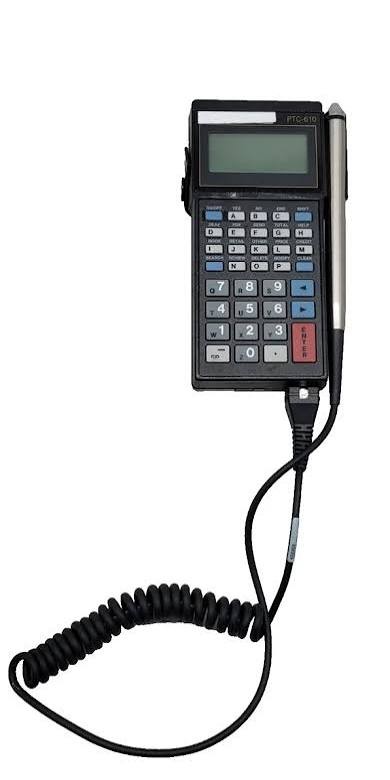
That is why Datex treats hardware selection as part of WMS workflow design, not as a separate equipment decision made after the software has been selected.
What Does It Mean to Treat Hardware and WMS as One Workflow?
Treating hardware and WMS as one workflow means looking at how the device, software, employee and warehouse process will work together from the beginning.
An employee receiving inventory is not thinking about where the hardware ends and the software begins. The employee needs to know what to receive, where the inventory belongs and which information to capture.
The same is true during picking, inventory movements, value-added services and shipping. The WMS applies the relevant rules and provides instructions. The mobile computer or barcode scanner delivers those instructions and captures the transaction as the work is completed.
Kim has seen value in bringing the hardware and WMS conversations together. After nearly three decades in the business, she has found that customers benefit from having a single resource who understands both the equipment and the workflow it supports.
A workflow may be configured correctly in the WMS, but it still has to work on the floor. That depends partly on how the device presents the workflow, captures information and communicates with the application.
Why is Hardware Especially Important for 3PLs?
Hardware is especially important for 3PLs because one warehouse team may perform different customer-specific workflows, capture different data, and trigger different billing activities using the same devices.
One customer may require additional information during receiving. Another may require relabeling, special handling or another value-added service before inventory is stored or shipped.
The WMS defines those requirements; the mobile workflow is where the employee receives the instruction and records that the work was completed.
This makes hardware usability and data capture operational considerations, not just IT specifications.
A device that works well for a straightforward inventory movement may not be equally suited to a workflow with additional customer-specific steps. Looking at the task, operating environment and required data together gives the 3PL a clearer basis for selecting and configuring its warehouse hardware.
How Can Data Capture Affect Inventory Visibility and 3PL Billing?
Warehouse data capture creates the operational record of what happened on the floor. Missing or inaccurate transactions can affect inventory records, customer visibility and the information available for billing.
When asked about persistent challenges facing 3PLs, Kim quickly identified billing. She also pointed to inventory accuracy and the visibility 3PLs provide to customers.
Although these may look like separate issues, they are connected by the operational record:
- A physical activity occurs, such as receiving, moving, handling, picking or shipping inventory.
- The mobile device captures the activity and records the transaction in the WMS.
- The transaction updates the operational record and may provide visibility to the 3PL and its customer.
- When the activity is chargeable, the transaction may also provide information used for billing.
The invoice may be generated in the office, but many of the activities represented on it begin on the warehouse floor.
Not every 3PL billing event originates from a scan. Recurring storage charges, contract terms and other billing rules may work differently. But when a charge depends on a completed warehouse activity, the device, transaction, WMS workflow and customer-specific billing rule are closely connected.
What Happens When a Device and WMS Stop Working Together?
When a warehouse workflow stops working, the operations team needs to get it moving again. First, however, someone may have to determine whether the issue involves the device, its configuration, connectivity or the WMS.
Kim has seen how quickly that uncertainty can become an operational problem.
Customers value having “one source versus multiple vendors and then pointing fingers,” she says.
From the warehouse’s perspective, the immediate issue is not which technology category owns the problem. It is that an employee cannot complete the warehouse task or record the transaction.
Additional support handoffs can mean more time explaining the issue, coordinating providers and determining responsibility.
Using one resource for hardware and WMS requirements cannot prevent every technology issue. It can provide clearer accountability and a better starting point for investigating a problem that crosses the boundary between the device and the application.
Why Does Device Preparation Matter Before Deployment?
Buying and delivering a warehouse device is not the same as making it ready for use. The device may need to be configured, connected to the applicable systems and tested against the workflows employees will perform.
Kim has seen the difference this preparation can make. Two Datex customers that use both Datex hardware and software highlighted the value of receiving devices configured and tested before deployment and having one source for hardware and WMS support.
That preparation matters because a device only becomes useful when it works in the actual warehouse environment. Looking at hardware alongside the WMS brings that conversation into the project earlier.
Instead of focusing only on “Which device are we buying?” the conversation becomes “How will an employee complete this process on it?”
Datex provides warehouse hardware solutions that can be selected, prepared and supported with the warehouse workflow in mind.
What Questions Connect Hardware Selection to WMS Workflow Design?
A hardware evaluation goes beyond comparing device specifications. It connects the equipment to the warehouse work employees will perform.
Five questions can help frame the evaluation:
- Which workflows will employees perform on each device?
- What information will they need to capture?
- Does the warehouse environment affect the device, connectivity or accessories required?
- How will the equipment be configured and tested before deployment?
- Who will investigate an issue involving both the device and the WMS?
These questions connect hardware selection to operational execution, data capture and ongoing support.
Does One Workflow Require One Technology Provider?
No. A 3PL can purchase warehouse hardware and WMS software from different providers while still planning and supporting them as one operational workflow.
A multi-provider model can work when responsibilities, technical dependencies and escalation paths are clearly defined.
Based on her experience, Kim recommends involving a provider that can take accountability across hardware and WMS planning when possible. A provider that understands both sides of the workflow can give customers a clearer starting point for support and reduce the time spent determining who owns an issue.
That does not mean every component has to come from the same company. It means someone needs to understand how the components work together and take responsibility when the workflow crosses from the device into the WMS.
Is Hardware Selection Part of WMS Workflow Design?
Yes. Hardware selection is part of WMS workflow design because the device is where employees receive instructions, capture information and confirm that warehouse work has been completed.
A WMS demonstration can show what the software is capable of doing. The warehouse floor shows how employees will put those capabilities into practice.
Footprint WMS provides the rules, workflows and operational record. The warehouse device is where employees carry out those workflows on the warehouse floor.
After 28 years in warehouse technology, Kim has worked through several generations of devices and software. Her central lesson is clear: hardware and WMS are not separate once the work begins.
A 3PL may buy them separately. On the warehouse floor, they still have to work as one.
Planning a hardware and WMS project? Talk with Kim and the Datex team about selecting, preparing and supporting the technology as one warehouse workflow.
About the Expert
Kim Ganoe is a Senior Hardware Specialist and Business Development Representative at Datex. During her 28 years with the company, she has watched warehouse technology evolve across multiple generations of devices, connectivity and warehouse management software.

Frequently Asked Questions About 3PL Hardware and WMS
How does warehouse hardware connect to a WMS?
Warehouse mobile devices give employees access to WMS instructions at the point of activity and capture information as work is completed. The device records transaction data during processes such as receiving, inventory movements, picking and shipping.
Why evaluate warehouse hardware during a WMS project?
Evaluating hardware during the WMS project connects device selection and configuration to actual warehouse workflows. It also creates time to address deployment, connectivity, data capture, testing and support before devices reach the floor.
Does a 3PL need to buy its hardware and WMS from the same provider?
No. Hardware and WMS can come from different providers. Based on her experience, Kim favors having one accountable provider or resource involved across both areas because it provides a clearer starting point when an issue crosses the boundary between the device and the WMS.
How can warehouse hardware affect 3PL billing and inventory visibility?
Warehouse devices record physical activity in the WMS. Missing or inaccurate transactions can affect inventory records, the information available to customers and the data used to support activity-based charges.